AscendraFit for trainers
Your coaching, in one place. Every client, every set, every check-in.
Build plans, see every finished workout, read the check-ins and send progress reports — in your computer’s browser and in the app. Your clients train in AscendraFit; you see what they do, set by set.
- Panel in the browser and in the app
- Invite clients with a link or a code
- Free for up to 3 active clients
Why switch
Coaching shouldn’t live in five apps. Bring it into one.
Spreadsheets, chats, notes and PDFs cost you time with every client. Here is what changes.
Plans in spreadsheets and PDFs
Plans inside the app
Days, weeks, supersets and AUTO in one editor — your client sees the plan the moment you assign it.
Check-ins lost in chats
Questionnaires with answers in one place
An intake questionnaire before the first plan and weekly check-ins — you see the answers on the client’s card.
No idea who actually trained
Every workout in your queue
Finished workouts wait for your review, and clients who have gone quiet are flagged.
Reports built by hand
A PDF report in one tap
A progress report or a summary of your whole cooperation, ready to send.
The trainer panel
Your desk for the whole roster. Four screens, everything in reach.
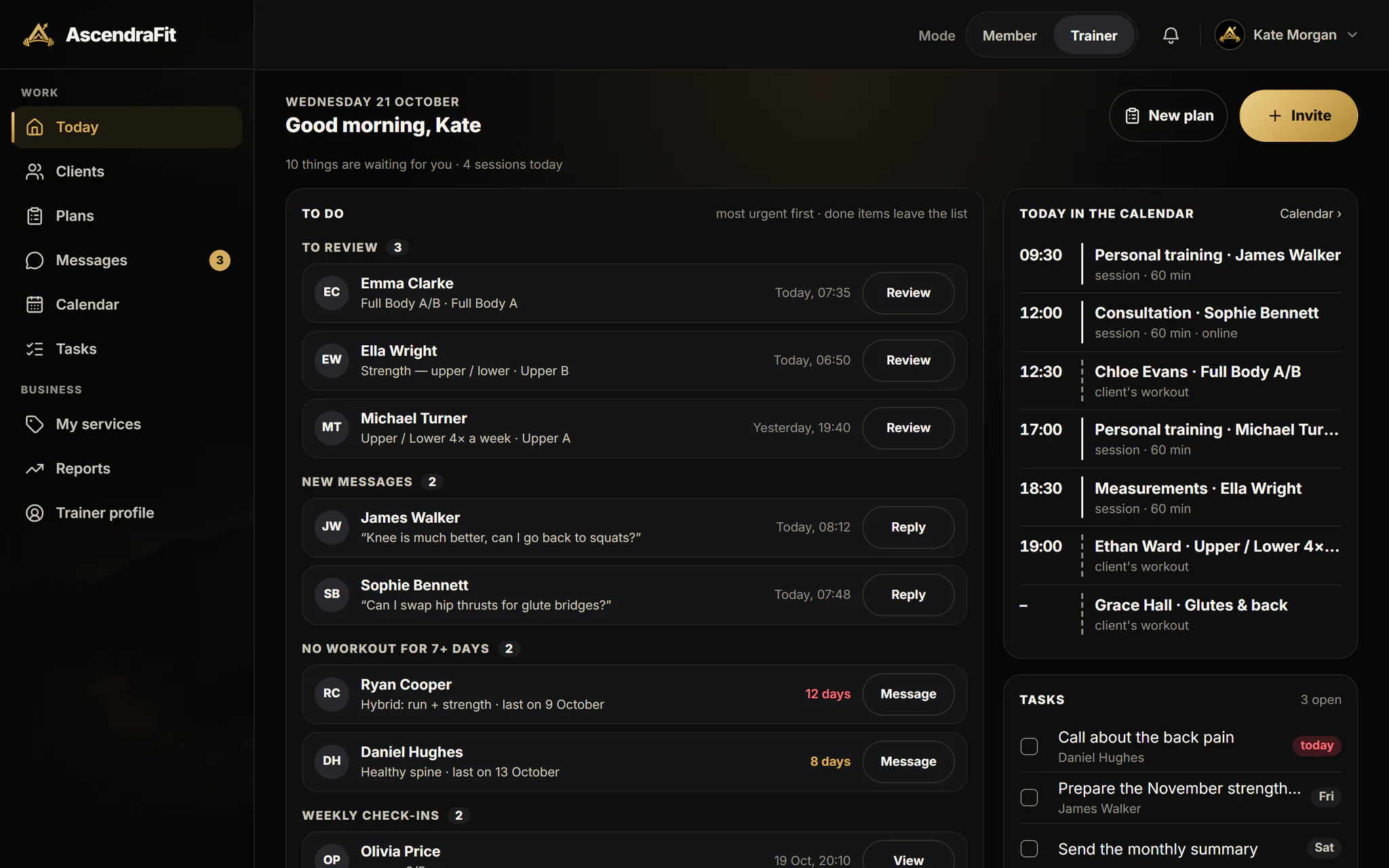
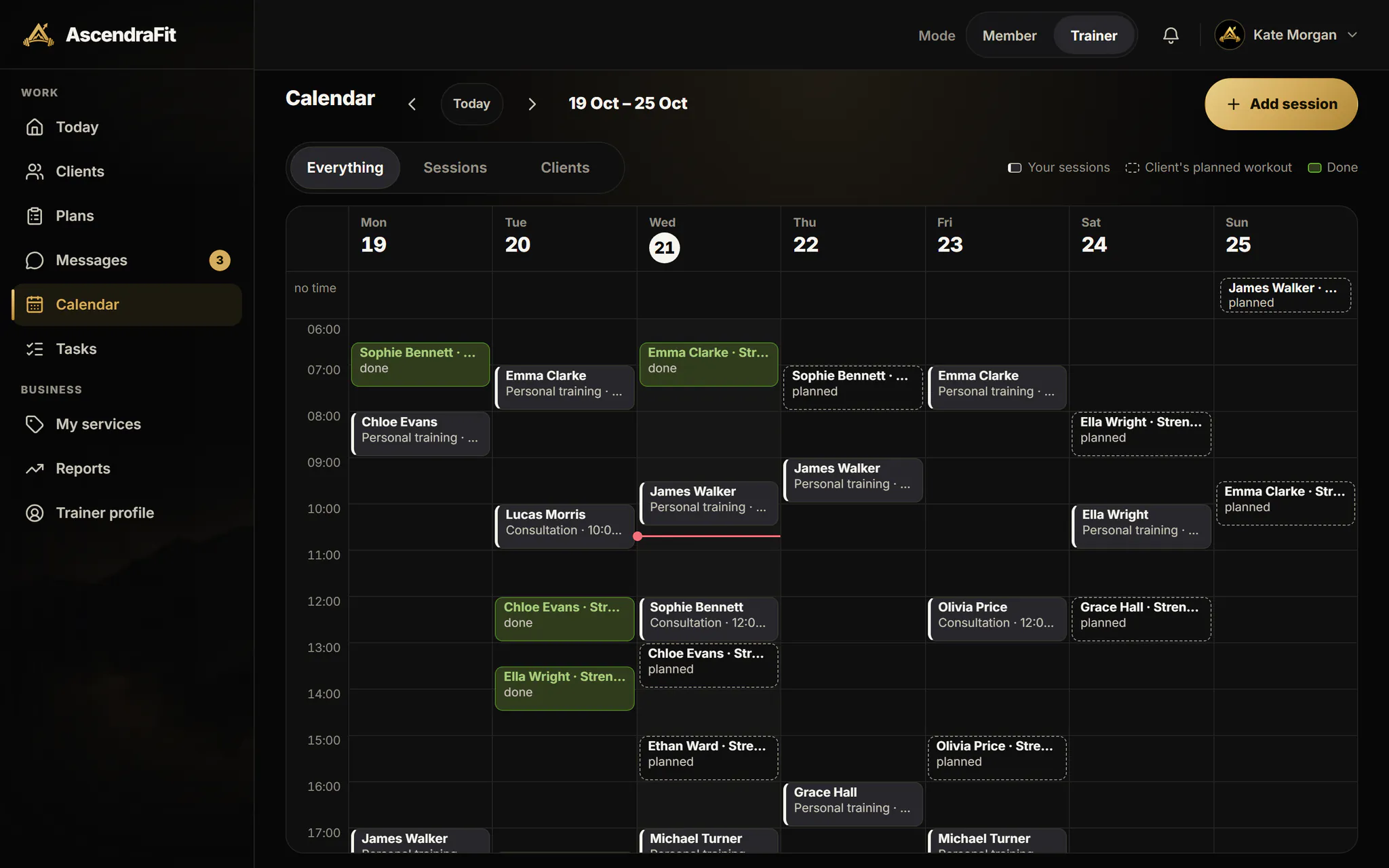
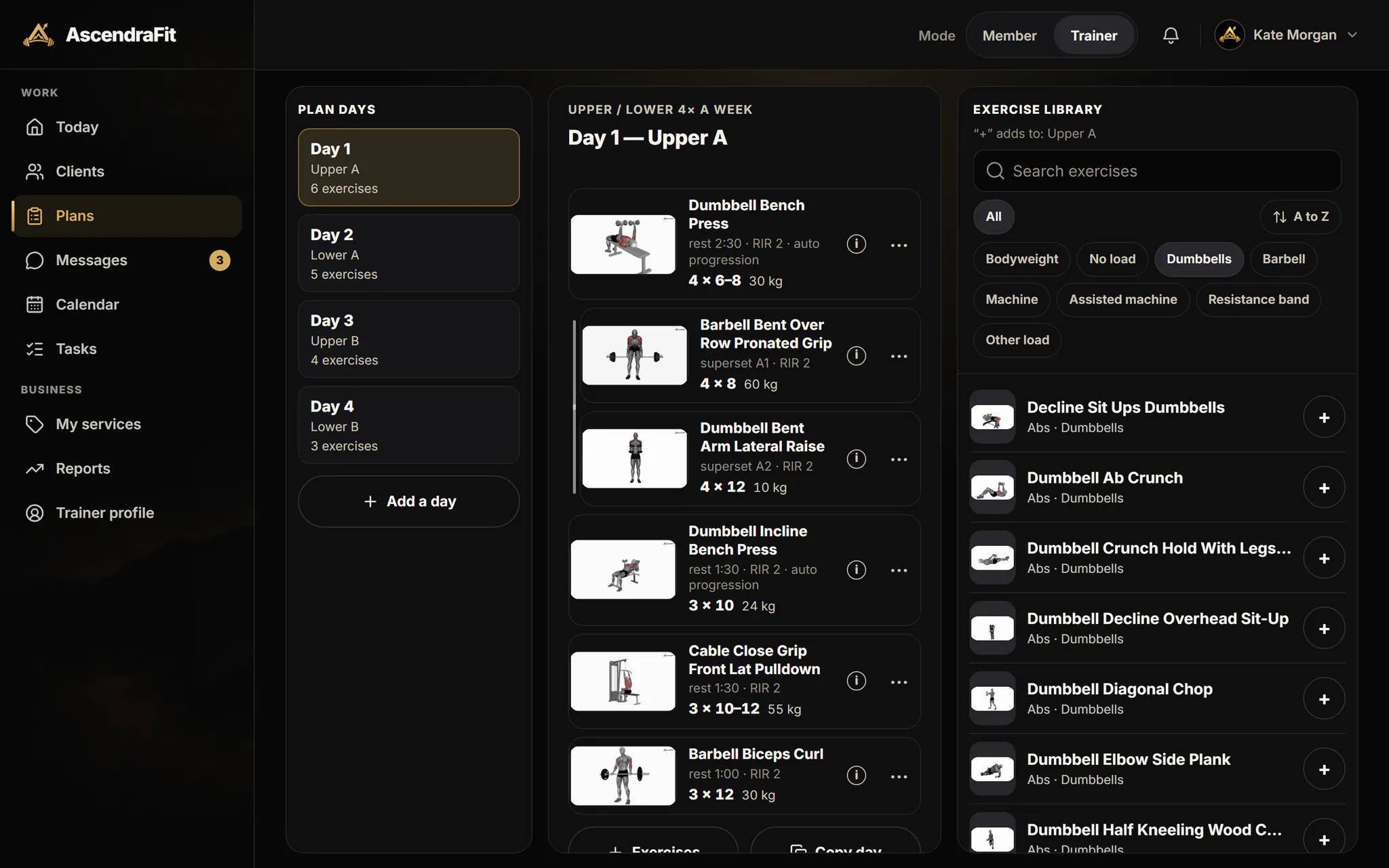
Today’s queue, your clients with a preview, the week in the calendar and a three-column plan editor. The same panel works in the phone app.
Your client sees your review of every workout in the app.
Clients
Know who needs you today. Before they have to ask.
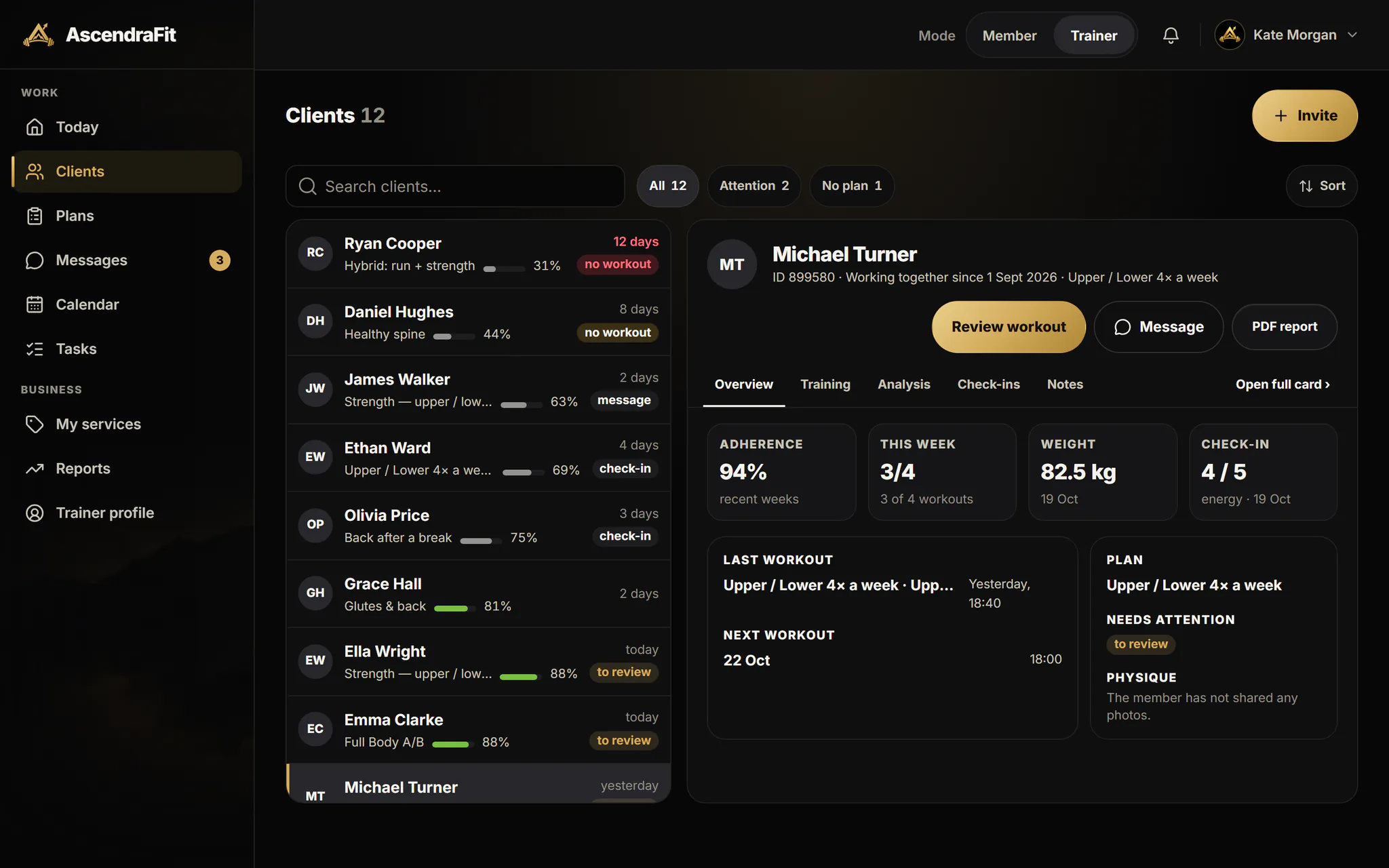
The client list shows plan adherence and every person’s last workout, and its filters pick out who needs attention and who has no plan.
Attention and no-plan filters
One tap shows the clients waiting for a word from you or for a new plan.
Adherence at a glance
Plan completion beside every client, and a preview with last and next workout, weight and check-in.
Invite with a link or a code
Send a link: your client signs up, accepts the consent and appears on your list. Your public trainer profile works as an invitation too.
Intake questionnaire
Every new client answers it before the first plan, so you start from facts, not guesses.
Plans
Build a plan once. Assign it in seconds.
A three-column editor: the plan’s days, the day’s exercises and the animated library to add from.
Three-column editor
Sets, rep ranges, RIR, rest and supersets in one view; copy a day when the next one is similar.
Weeks and a start date
Plan in weeks and assign the plan from the date you choose.
AUTO built in
Switch AUTO on for an exercise and the load rises with your client’s results.
Your tips on exercises
Add a cue to an exercise — every one of your clients sees it on that exercise.
Progress
See every set your clients do. Reply while it matters.
Finished workouts land in your Today queue. Review them, leave feedback and keep an eye on the whole week.
Workout reviews
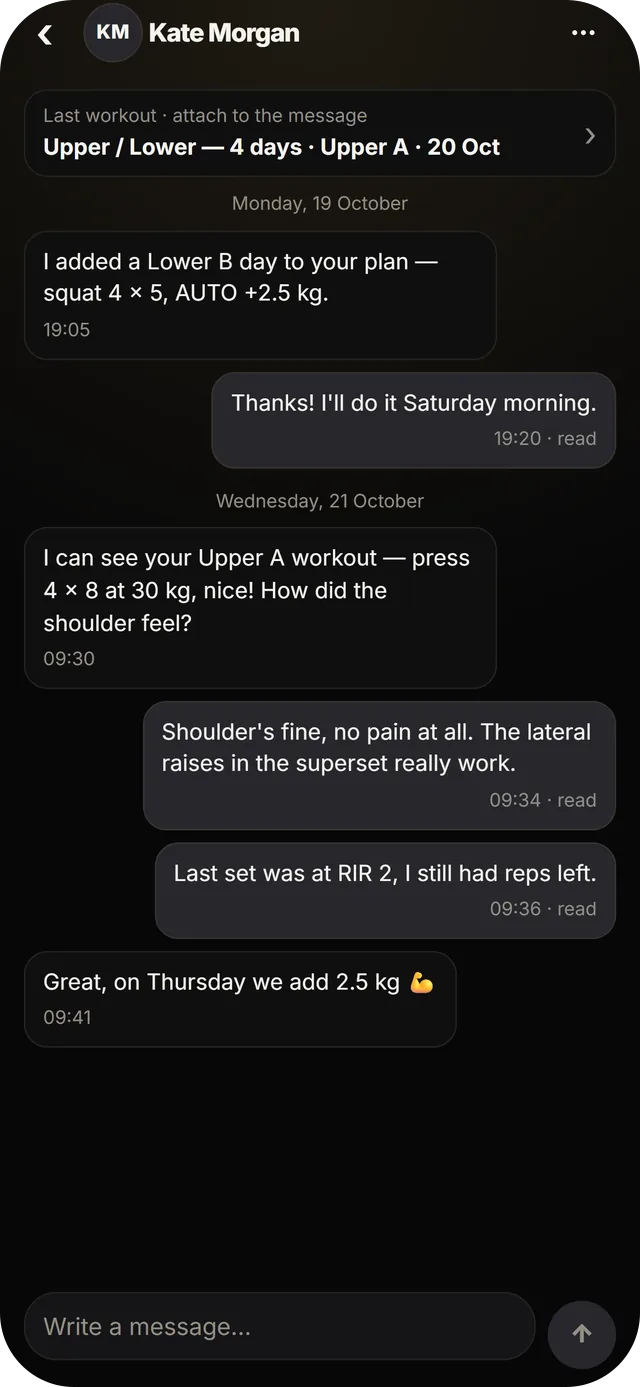
Open a finished workout, check it and send your feedback — your client sees it in their app.
Chat with the workout attached
Talk about a specific workout, with the result right in the conversation.
Weekly check-ins
A short questionnaire every week; the answers arrive on the client’s card.
Calendar and reminders
Your sessions and your clients’ workouts on one hourly grid, with reminders.
Reports
Show the progress. In a document worth sending.
Turn the data you see as a trainer into a PDF your client can keep.
Progress report
Your client’s progress over the period you pick, as a PDF ready to download and send.
Cooperation report
A summary of your whole cooperation: how long it has lasted, workouts and plan completion, strength progress, first and latest measurements and goals — with your closing note.
Client analysis
Each client’s analysis beside their plan: volume, training time and the muscle map.
Pricing for trainers
Start free. Scale as your roster grows.
The panel is free for your first clients. Pro raises the client limit and adds the full analysis of every client.
Every feature in the app is available today. Premium and Pro launch soon.
Free panel
PLN 0
up to 3 active clients
The whole trainer panel, no card needed
Pro 10
Launching soon
PLN 99.99/ month
up to 10 active clients
PLN 999.99 / year
Pro 30
Launching soon
PLN 149.99/ month
up to 30 active clients
PLN 1,499.99 / year
Pro 75
Launching soon
PLN 299.99/ month
up to 75 active clients
PLN 2,999.99 / year
- Premium for you included
- Full analysis of every client
- Unlimited collaboration PDF reports
- Your clients don’t need Premium to train with you
How do I start as a trainer?
How do I invite my clients?
Do my clients need to pay?
How many clients can I coach for free?
Can I work on a computer?
Can I train with AscendraFit myself?
What can I see of my clients’ data?
Do I get paid through the app?

For trainers
Bring your clients into one place.
Create your account, switch the trainer panel on and invite your first client today.